BunのSQLiteドライバーを使ってTodo機能実装
はじめに
今回書いたコードはこちら
Bun の SQLite について説明されているサイトはこちら

環境構築
Bun の型情報を反映させるため@types/bunをインストールします。
bun add -D @types/bunデータベース作成
db.tsファイルを作成し、初期設定を行います。
import { Database } from "bun:sqlite";

const dbFileName = "database.sqlite";
const tableName = "todos";

// ファイルが存在しない場合、データベースを作成する
const db = new Database(dbFileName, { create: true });

// テーブルが存在しない場合作成する
db.run(`
  CREATE TABLE IF NOT EXISTS ${tableName} (
    id INTEGER PRIMARY KEY AUTOINCREMENT,
    title TEXT NOT NULL,
    completed BOOLEAN NOT NULL DEFAULT false
  )
`);

export default db;bun:sqliteからDatabaseを import してdbインスタンスを作成します。
createオプションを true にすることで.sqliteファイルが存在しないとき作成するように設定できます。
ちなみにインメモリーで作成するには以下の三種類の方法があります。
import { Database } from "bun:sqlite";

// all of these do the same thing
const db = new Database(":memory:");
const db = new Database();
const db = new Database("");
サーバー
実は自分ですべてを書いたコードは上記の db 部分のみでして、これ以降のコードはだいたい ChatGPT に書いてもらいました。 私は ChatGPT が書いたコードのエラーを解消しただけで、Todo 機能を実装してというアバウトな指令でだいたい書いてくれるので便利ですね。
import { serve } from "bun";
import db from "./db";
import { join } from "path";
import { readFile } from "fs/promises";

const PORT = 3000;

const isGetMethod = (req: Request) => req.method === "GET";
const isPostMethod = (req: Request) => req.method === "POST";
const isPutMethod = (req: Request) => req.method === "PUT";
const isDeleteMethod = (req: Request) => req.method === "DELETE";
const getIdFromPath = (path: string) => parseInt(path.split("/").pop() || "", 10);

const serveStaticFile = async (filePath: string, contentType: string) => {
  const fullPath = join(__dirname, filePath);
  const content = await readFile(fullPath, "utf-8");
  return new Response(content, { headers: { "Content-Type": contentType } });
};

const getTodos = () => {
  const todos = db.query("SELECT * FROM todos").all();
  return new Response(JSON.stringify(todos), {
    headers: { "Content-Type": "application/json" },
  });
};

const createTodo = async (req: Request) => {
  const { title } = await req.json();
  db.run("INSERT INTO todos (title) VALUES (?)", [title]);
  return new Response("Todo created", { status: 201 });
};

const updateTodoStatus = async (req: Request, id: number) => {
  const { completed } = await req.json();
  db.run("UPDATE todos SET completed = ? WHERE id = ?", [completed, id]);
  return new Response("Todo updated", { status: 200 });
};

const deleteTodo = (id: number) => {
  db.run("DELETE FROM todos WHERE id = ?", [id]);
  return new Response("Todo deleted", { status: 200 });
};

const handleRequest = async (req: Request) => {
  const url = new URL(req.url);

  if (isGetMethod(req) && url.pathname === "/") {
    return serveStaticFile("../public/index.html", "text/html");
  }

  if (isGetMethod(req) && url.pathname === "/todos") {
    return getTodos();
  }

  if (isPostMethod(req) && url.pathname === "/todos") {
    return createTodo(req);
  }

  if (isPutMethod(req) && url.pathname.startsWith("/todos/")) {
    const id = getIdFromPath(url.pathname);
    return updateTodoStatus(req, id);
  }

  if (isDeleteMethod(req) && url.pathname.startsWith("/todos/")) {
    const id = getIdFromPath(url.pathname);
    return deleteTodo(id);
  }

  if (isGetMethod(req) && url.pathname === "/app.js") {
    return serveStaticFile("../public/app.js", "application/javascript");
  }

  return new Response("Not Found", { status: 404 });
};

serve({
  fetch: handleRequest,
  port: PORT,
});

console.log(`Server running on http://localhost:${PORT}`);
ここでは URL のパスによって Todo を作成したり削除したりの制御を行っています。
ルート URL にアクセスしたときに、public ディレクトリ内にある HTML ファイルを読み取った内容を返します。
db.runメソッドのコードでは、第二引数にある配列が「?」に入ってきます。
これによって SQL インジェクションを防ぐことができます。
フロント
サーバー側で以下の HTML 情報を読み込んでクライアントに返しています。
<!DOCTYPE html>
<html lang="en">
  <head>
    <meta charset="UTF-8" />
    <meta name="viewport" content="width=device-width, initial-scale=1.0" />
    <title>ToDo App</title>
  </head>
  <body>
    <h1>ToDo App</h1>
    <form id="todo-form">
      <input type="text" id="todo-title" placeholder="Enter a new todo" required />
      <button type="submit">Add Todo</button>
    </form>
    <ul id="todo-list"></ul>
    <script src="/app.js"></script>
  </body>
</html>
以下の JavaScript ではフォームが送信されたときや Todo が操作されたときのイベントを読み取ってサーバーに情報を送っています。
document.addEventListener("DOMContentLoaded", () => {
  const form = document.getElementById("todo-form");
  const titleInput = document.getElementById("todo-title");
  const todoList = document.getElementById("todo-list");

  form.addEventListener("submit", handleFormSubmit);
  todoList.addEventListener("click", handleTodoListClick);

  async function handleFormSubmit(e) {
    e.preventDefault();
    const title = titleInput.value.trim();
    if (title) {
      const res = await fetch("/todos", {
        method: "POST",
        headers: { "Content-Type": "application/json" },
        body: JSON.stringify({ title }),
      });
      if (res.ok) {
        loadTodos();
        titleInput.value = "";
      }
    }
  }

  async function handleTodoListClick(e) {
    const target = e.target;
    const id = target.dataset.id;
    if (target.tagName === "BUTTON") {
      await deleteTodoItem(id);
    } else if (target.tagName === "INPUT") {
      await updateTodoItem(id, target.checked);
    }
    loadTodos();
  }

  async function deleteTodoItem(id) {
    const res = await fetch(`/todos/${id}`, { method: "DELETE" });
    return res.ok;
  }

  async function updateTodoItem(id, completed) {
    const res = await fetch(`/todos/${id}`, {
      method: "PUT",
      headers: { "Content-Type": "application/json" },
      body: JSON.stringify({ completed }),
    });
    return res.ok;
  }

  async function loadTodos() {
    const res = await fetch("/todos");
    const todos = await res.json();
    renderTodoList(todos);
  }

  function renderTodoList(todos) {
    todoList.innerHTML = "";
    todos.forEach((todo) => {
      const li = document.createElement("li");
      li.innerHTML = `
        <input type="checkbox" data-id="${todo.id}" ${todo.completed ? "checked" : ""}>
        ${todo.title}
        <button data-id="${todo.id}">Delete</button>
      `;
      todoList.appendChild(li);
    });
  }

  loadTodos();
});
おまけ
Bun のバンドラーには JavaScript をスタンドアローンで生成する機能があります。
今回作成した Todo アプリも以下のコマンドでスタンドアローンとして生成することができます。
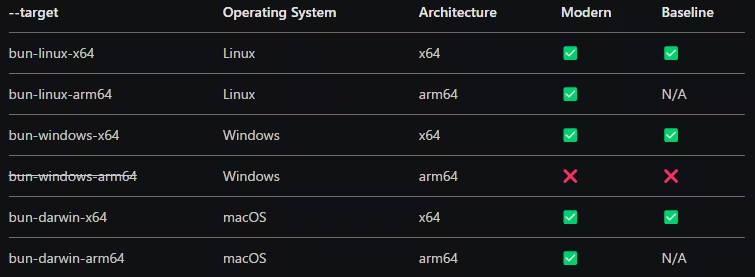
bun build --compile --minify --sourcemap src/server.ts --outfile [app-name]対応している環境は以下の画像になります。
Bun 側で自動にそれぞれの環境にあったアプリに変換してくれます。
--targetフラグを付けることで指定することもできます。